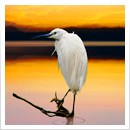
1. Find a photograph published on a website of a
newspaper or news magazine. The photograph
should be visually engaging and capture your
attention. The photograph may NOT be an
advertisement. (20 pts.)
2. Download photograph from the web, which
should be in the “.jpg” format. Create a Word
document to insert the image in making sure that it
is at least ¾ of the page width. (15 pts.)
3. Your header should be complete with the required
information that is on the assignment sheet.
(10 pts.)
4. Your photograph must be correctly cited in APA
format, with a properly working link. (15 pts.)
5. Save the file with the correct title as described on
the assignment sheet. (15 pts.)
6. Write a paragraph describing the image and
explain why you picked this particular image. If
you choose a news photograph, you should also
write about how well the story is conveyed through
the imagery. (25 pts.)
co- A ignmCenoptmhotuongicraatiphnic
3403 find a striking
sec- photograph
04
Find a photograph published on a website of a newspaper or
mon.- news magazine. Flickr, Google Images, and similar photo sharing
wed. sites are not allowed. The photograph should be visually engaging
and capture your attention. The photograph may NOT be an
10:00am advertisement.
11:50am
PROCEDURE FOR SAVING THE IMAGE FILE
Download from the web (Click & Drag to Flash Drive). Files should
be in the “.jpg” format. You may wish to store this image on your
Flash Drive. (If the image you find is in a “flash” or other proprietary
format –you will not be able to copy it to your Word file.)
PROCEDURE FOR CREATING THE MICROSOFT WORD DOCUMENT
On the top of the page add the following information:
Your Name, Course #-Section, Year, and Assignment: Week #
Example:
Angela Latham
CO 3403-04, Fall 2017
Journal Assignment: Striking Photograph Week 1
Place the .jpg image into a Microsoft Word document, if you have
not already done so. You may need to resize the image to fit on
the page. Image must be at least ¾ of the page width. If your
image is too small or looks like a “bunch of blocks”, you need to
choose a larger image. A thin border is acceptable around the
image.
Cite your references in APA format under the image, and write
a paragraph describing the image and thinking through the
following questions. What drew you to the photograph? Did you
respond to the colors / tonality? Did you like the scene / subject
matter? Did you find the organization (composition) of the
imagery on the page compelling? Explain to the viewer why you
picked this particular image. If you choose a news photograph,
you should also write about how well the story is conveyed
through the imagery.
Save the document with the following title: (NO SPACES)
First Name Last Name_ Course #-Section _SP.docx
Example:
AngelaLatham_CO3403-04_SP.docx
We will view and collect these files in class. Be prepared to talk about the imagery. Do not
PRINT your assignment –we will file-share it at the beginning of class.
2 Sample Journal Entries for Your Reference:
Student Name
CO 3403-04, Semester Year
Journal Assignment: Striking Photograph Week 1
Bisharat, A. (2015, January 13) Chasing History, Yosemite Climbers Sand and Superglue Their
Fingers. [National Geographic]. Retrieved from
http://news.nationalgeographic.com/news/2015/01/150113-climbing-yosemite-
capitan-dawn-wall-caldwell-jorgeson/
This is a Nat Geo story about Tommy Caldwell and Kevin Jorgeson taking care of their hands
as they make one of the most difficult climbs in the world –Dawn Wall on Yosemite National
Park’s El Capitan. This is a huge climb up a sheer, vertical rock face that is essentially all
fingers and toes. The article is about how they go about preparing and taking care of their
fingertips before and during the climb.
This image caught my attention not because it was the most graphic depiction of the life-
or-death situation they are putting themselves in, but rather because of the nonchalant
demeanor depicted in spite of the situation. This is Jorgeson checking to see how much skin
has grown back on his fingers overnight as he sits 1200ft up the side of the mountain.
The perspective makes this photo. Looking down to see his legs dangling over the edge of
nothingness beautifully captures the environment in which this event takes place. But, it’s not
about the mountain climb itself; it’s about taking care of their fingers, so it really works well for
the story.
Student Name
CO 3403-04, Semester Year
Journal Assignment: Striking Photograph Week 1
Mark, M. (2015, January 10) Boko Haram’s ‘deadliest massacre’: 2,000 feared dead in
Nigeria. [The Guardian]. Retrieved from https://www.theguardian.com/world/2015/
jan/09/boko-haram-deadliest-massacre-baga-nigeria
I was drawn to this image because of the complexity that it represents. Boko Haram, a
Nigerian Islamic terrorist organization carried out extremely deadly attacks on Wednesday,
January 7 2015, leaving at least 2,000 innocent people dead. This image seems to portray
the confusion and overall lack of direction that people in the country seem to have.
These children are caught struck in a normalized fear. Their bikes may be one of their only
possessions to which they can still hold dear. And then, in another sense, life just seems to go
on as if they are oblivious, or perhaps used to the mayhem. This image is interesting to me
because it is impossible to look at and not feel a sense of sympathy, and even respect for
these children who live through this.
co- A ignmCenoptmhotuongicraatiphnic
3403 the chair
sec- rubrics
04
1. Find a chair –ANY chair. It can be an interior or exterior chair.
You should be able to move the chair to different locations.
Using 24 consecutive exposures, explore the variety of ways
that your chair can be captured in camera. Shoot only 24
exposures on your memory card –do not delete any attempts.
It MUST be the same chair in each and every shot and the
chair must be a visible part of every image. No 2 shots may be
identical. (25 pts.)
2. All image adjustments should be done using “non-destructive”
editing techniques. Non-destructively cropped with minimum
Pixel Data at least 75% of uncropped file. Must contain both a
B/W Adjustment Layer and a Curve adjustment layer. (25 pts.)
3. All 24 photographs should be in color, resized correctly, and
labeled using the label menu explained on the assignment
sheet. (25 pts.)
4. Zip file and upload all 24 images to Blackboard along with the
Final Non destructive black and white photograph. (15 pts.)
5. All files should be Named Correctly, as explained on
assignment sheet. (10 pts.)
mon.-
wed.
10:00am
11:50am
co- A ignmCenoptmhotuongicraatiphnic
3403 the chair
sec- part 1
04 details
Review Chapter 1-3 as needed. Read Chapter 9: Seeing Like A Camera
mon.-
wed. The purpose of this assignment is to explore the variety of ways that
a singular object can be photographed.
10:00am
11:50am Find a chair –ANY chair. It can be an interior or exterior chair. You
should be able to move the chair to different locations. Using 24
consecutive exposures, explore the variety of ways that your chair
can be captured in camera. Think about the imposition of the
rectangular frame of the viewfinder as you include and exclude
objects from the frame while composing your shots.
Shoot only 24 exposures on your memory card –do not delete any
attempts. Feel free to take some experimental shots first. It MUST
be the same chair in each and every shot and the chair must be a
visible part of every image. No 2 shots may be identical.
Please remember to meter for all exposures. Recall what you have
learned about the aperture and the shutter of the camera from
Basic Camera Use. Think about how the aperture controls the
appearance of spatial depth and how the shutter controls the
appearance of motion in the photograph. Consider exploring how
different styles of light and shadow can affect the scene.
Objectives
•Explore composition and creativity
•Work within limitations
•Explore the frame of the photograph
Specifications
•dSLR camera at ISO 400 set at RAW+JPG, monochrome mode
•There will be a separate handout for the formatting of this project.
Helpful Tips & Things to Remember
•Keep Trying New Things!
•Remember to focus and meter EVERY shot.
•Try different apertures
•Can your chair move? Consider motion shots.
•Get further away - get close up...get higher -get lower...go to the
left-go to the right...
•Think about how you are representing the chair.
co- A ignmCenoptmhotuongicraatiphnic
3403 the chair
sec- part 1
04 formatting
1. There are 2 parts to formatting your Chair, Part I Formatting
Assignment. The first part is to copy & resize your images in a new
folder and the second part is to use the ratings system in Adobe
Bridge CC to organize your files into 4 groups [selected (5 stars),
review (3 stars), others (one star), rejected.
Copy & Resize Your Images
2. Using the Adobe Bridge Program (essentials module), navigate to
your Chair images and select all 24. You can use either the RAW or
.jpg version of the image.
3. With your images selected, go to the Tools - Photoshop - Image
Processor
2
3
mon.- 4 5
wed. 7
4. From the Image Processor
10:00am Dialog Box, in section #2, click 68
11:50am Select Folder.
5. The “Pick a destination
folder box will appear. Select
“Desktop on the left side of
the screen.
6. Then click New Folder at the
bottom left side of the screen.
7. The New Folder box will
appear, create a new folder
on your Desktop called
“LastName_Chair”. Click
Create.
8. Then Click“Open”
9. Then you will go back to the image processor box 10
and adjust the options in Sections 3 & 4 to match 9
the screen shot. (Save as JPEG, Quality 10, Convert
Profile to sRGB profile, resize to fit 2000 px for W&H, & 12
include ICC profile)
10. Click “Run” when finished to create your folder of
re-sized Chair images.
Rating Your Images
11. Navigate to your folder of re-sized images in the
Adobe Bridge Program (essentials module)
Using the Label menu –Attach the
following ratings to your images.
(Select an image, then go to the Label
menu)
5 Stars – Your favorite Chair image
3 Stars – 6-10 of your best images
1 Star – All other images
Reject –Up to 3 images can be
selected as rejects
12. Use the Filter options (right hand edge
of window) to see what happens when
you filter by different ratings.
11
co- A ignmCenoptmhotuongicraatiphnic
3403 the chair
sec- part 2
04 learning to edit in photoshop
mon.- The following sections in A Short Course in Digital Photography:
wed. 1e relate to this assignment:
Chapter 4: The Digital Darkroom.
10:00am Chapter 5: Image Editing, 87-89, 92-93,96, 98, 104, 106-7
11:50am
Objectives
You will use this assignment to make the shift from “in-camera”
editing to using “post-processing” methods of image editing.
You will learn how to use Adobe Photoshop to make simple but
professional adjustments such as cropping, tonal adjustments,
removal of small image flaws, and including written information
within your digital file. All image adjustments will be done using
“non-destructive” editing techniques.
Specifications
• The original digital negative MUST be from Chair, Part I
• 1 Digital File (.psd format) due – This will be file-shared at critique
time.
Editing Procedures
• Follow the basic instructions on your Photoshop Editing handout.
• Adjust your RAW image file in the Adobe Camera Raw (ACR)
Basic Tab for:
• Tone
• Temperature
• Exposure, if necessary
• Whites and Highlights, if necessary
• Blacks and Shadows, if necessary
• Clarity
• Also in ACR - Enable Lens Corrections (6th tab) or it
can be found by going to Filter > Lens Correction.
• Check ‘Remove Chromatic Aberration’ & ‘Enable
Profile Corrections’
• Select your Camera in the Lens Profile Section
• Import into Photoshop as a “Smart Object”
• Non-destructively cropped with Minimum Pixel
Data at least 75% of uncropped file
(ex: 12.1 MP camera with a 34.5 MB file can be
cropped down to a 26 MB file size)
• Must contain both a B/W Adjustment Layer and a
Curve adjustment layer
• In the “File Info” section – include your name and
the assignment Name (Fileà File Info)
• Save using the .psd (Photoshop) format ONLY
once you are working within Photoshop.
• The FINAL version of your files should be named:
firstnameLastnameASSIGNMENT.
(Ex: johnDoeChair.psd, - WITH NO SPACES)
co- A ignmCenoptmhotuongicraatiphnic
3403 technical portfolio
sec- details
04 rubrics
mon.- Aperture - Depth of Field -100
wed.
1. Explore various camera aperture adjustments and variables
10:00am such as the time of day or differing lighting conditions. (25 pts.)
11:50am
2. Be prepared to show your images on “Preview Day.” (25 pts.)
3. Upload two files, Depth of Field Long and Short. These files
should show your understanding of the range of critical focus
and your control of the appearance of space and depth
within an image. (35 pts.)
4. All images should be named with your first & last names,
ending in the appropriate label 15 pts.)
Shutter - Motion - 100
1. Explore various camera shutter speed adjustments and
variables such as the time of day or differing lighting
conditions. (25 pts.)
2. Be prepared to show your images on “Preview Day.” (25 pts.)
3. Upload three files, Motion Stop, Blur, and Pan. These files should
show your understanding of the ability to capture critical
moments of movement for the different motions. (35 pts.)
4. All images should be named with your first & last names,
ending in the appropriate label 15 pts.)
Natural Lighting - 100
1. Explore various camera shutter speed adjustments and
variables such as the time of day or differing lighting
conditions. (25 pts.)
2. Be prepared to show your images on “Preview Day.” (25 pts.)
3. Upload three files, Motion Stop, Blur, and Pan. These files should
show your understanding of the range of critical focus and
your control of the appearance of space and depth within an
image. (35 pts.)
4. All images should be named with your first & last names,
ending in the appropriate label 15 pts.)
“BEST” four images and Journal Proponent - 100
1. Choose the 4 “BEST” images (or 5 for extra credit) of your
choice, from any category and adjust them in ACR. (40 pts.)
2. Upload these files along with your journal proponent to
Blackboard (60 pts.)
co- A ignmCenoptmhotuongicraatiphnic
3403 Depth of Field
sec- Technical Portfolio
04
The following sections in A Short Course in Digital Photography, 1e relate to this
mon.- assignment: Pages: 22-23, 24-25, 40, 42-47.
wed. Also see Chapter 9: Seeing Like a Camera
10:00am Depth of Field is also described as the range of critical focus. This
11:50am range covers the zones in the negative, from near to far, that are in
sharp, or acceptable focus. The two types of depth of field
covered in this assignment are Long and Short.
Depth of Field can be controlled by the focal length of the lens,
camera distance from the subject, and by the aperture of a cam-
era. This assignment is restricted to depth of field controlled by
Aperture.
Two digital files are due for this assignment - one Long Depth of
Field and one Short Depth of Field.
Long Depth of Field (if you have a zoom lens - set “zoom” wide)
• Requires small aperture openings such as f/22or higher- Use your
minimum aperture!
• Detail must be present in all areas of the image. This includes
foreground, middle ground, and
background (all grounds required). Everything in the image must
be in sharp focus.
• Scene should start @ 5 feet from camera and extend no more
than 25 feet from the camera.
• Focus on middle ground object – good distance 8-12 feet from
camera.
Short Depth of Field (if you have a zoom lens - set “zoom” narrow)
• Requires large aperture openings - Use your maximum aperture!
• Only the subject/middle ground should be in sharp focus.
• You should see the transition into & out of the focal plane.
• You may wish to create a scene that is closer to the camera,
especially with a zoom lens or dSLR.
• Focus on middle ground object – good distance 2-4 feet from
camera.
Objectives
• To familiarize the student with the aperture of the camera, in-
cluding control of the appearance of space and depth within an
image.
Preview Days – Have Example (unedited) Digital Files Ready for Class Pre-Critique
October 4, 2017 (can show updates on later Preview dates as well)
Helpful Tips & Things to Remember
• Your camera has an optimum focusing range for objects between 5 –25 feet away
• Proper focus is essential, especially for short depth of field
• Proper exposure is crucial to producing a good image. Since your aperture is fixed for this
assignment, remember to adjust your shutter speed to achieve the correct exposure
• Avoid the obvious and the cliché – search for a new interpretation
• Get close enough so that your intended subject fills the viewfinder
• Think about your position (point of view) in relation to your subject
• Remember to focus your images & use the correct exposure ratio
co- A ignmCenoptmhotuongicraatiphnic
3403 technical portfolio
sec- details
04
The purpose of the technical portfolio is to explore various camera
mon.- adjustments (aperture and shutter) and variables such as the
wed. time of day or differing lighting conditions. From these exercises
the student should understand how and why to set the camera
10:00am controls and also how to interpret and utilize styles of available
11:50am light.
Aperture - Depth of Field
Depth of Field is also described as the range of critical focus. This
range covers the zones in the negative, from near to far, that are
in sharp, or acceptable focus. The two types of depth of field
covered in this part of the assignment are Long and Short.
Shutter - Motion
The shutter of the camera controls the amount of time light is
allowed to strike the surface of the film. Motion is controlled by the
speed of the shutter. The three types of motion covered in this part
of the assignment are Stop, Blur, and Pan.
Styles of Natural Lighting
The aperture and shutter speed are both very important
considerations when taking a photograph but it is also important
to understand the nature of different styles of light. The four types
of light covered in this part of the assignment are Direct, Indirect,
Diffused, and Silhouette.
All images should be named with your first & last names with the
appropriate label (below)
• Long Depth of Field = LDF
• Stop Motion = SM
• Direct Light = DL
• Short Depth of Field = SDF
• Blur Motion = BM • Indirect Light = IL
• Pan Motion = PM
• Diffused Light = EL
• Silhouette Light = SL
“Preview” Days
Check individual sheets for “Preview” days.
On “Preview” days be prepared to project and share at least one example image from
each required category.
IE: On the Depth of Field preview day – show at least one image for both Long and Short
Depth of Field.
JPGs from the camera are acceptable for “Preview Days” but examples must be imported
from RAW files by the final deadline.
“Preview Day” Images are non-binding. Please take the time to re-shoot any problem
images. The main focus of each “Preview Day” will be on a specific assignment (aperture,
shutter, light) but images from any section can be shown, including re-shot images.
Failure to present required images on preview days will cause a loss of 5 points per image off
of the final project grade.
Individual Preview Days listed on the assignment handouts.
Journal Proponent
Find published examples of photographs from each part of the assignment
• Depth of Field (Long & Short)
• Motion (Stop, Blur & Pan)
• Lighting (Direct, Indirect, Diffused, Silhouette)
Show and correctly identify all images.
Pick 1 image from each category and write a 1-2 paragraph critical analysis of the selected
images IN CORRECT APA FORMAT.
Be sure to mention how the camera controls and/or lighting styles affect the scene, the
mood and the “readability” of the image”.
co- A ignmCenoptmhotuongicraatiphnic
3403 Technical Portfolio
sec- Formatting
04
You must have 9 images and all images should be named with
mon.- your first & last names with the appropriate label (below):
wed.
• Long Depth of Field = LDF
10:00am • Short Depth of Field = SDF
11:50am • Stop Motion = SM
• Blur Motion = BM
• Pan Motion = PM
• Direct Light = DL
• Indirect Light = IL
• Diffused Light = EL
• Silhouette Light = SL
No jpg format files are acceptable for any part of this assignment.
Your 4 (or 5 for extra credit) “BEST” images (your choice, from any
category) should be:
• Adjusted in the Adobe Camera Raw (ACR) Basic Tab for:
o Tone
o Temperature
o Exposure, if necessary
o Whites and Highlights, if necessary
o Blacks and Shadows, if necessary
o Clarity
• Also in ACR - Enable Lens Corrections (6th tab)
o Check ‘Remove Chromatic Aberration’ & ‘Enable Profile
Corrections’
o Select your Camera in the Lens Profile Section
• Imported into Photoshop as a “Smart Object”
• Non-destructively cropped with Minimum Pixel Data at least 75%
of uncropped file
• Contain both a B/W Adjustment Layer and a Curve adjustment
layer
• Include pertinent File Info such as your name and the assignment.
Don’t forget to include information about the time of day and
lighting conditions, how you set up / decided on your scene and
why it fits the goals of the assignment.
• Saved as a .psd format file
Other images:
• Make sure in the Camera Raw Preferences (found in Bridge) –General that ‘Save images
settings is set for ‘Camera Raw database’.
• Open in ACR to and click “Convert to Grayscale” in the HSL/Grayscale tab (4th tab)
• Click done after adjusting, no further action is needed besides this and renaming the file.
co- A ignmCenoptmhotuongicraatiphnic
3403 Motion
sec- Technical Portfolio
04
The following sections in A Short Course in Digital Photography, 1st Edition
mon.- relates to this assignment: Pages 18-21, 24-5, 154-5
wed.
The shutter of the camera controls the amount of time light is
10:00am allowed to strike the surface of the film. Motion is controlled by the
11:50am speed of the shutter.
Three digital files are due for this assignment – One each of Stop
Motion, Blur Motion, & Pan Motion
MOTION STOP
Stop action is the freezing of the subject in motion at a transitional
point or critical moment.
• The action should be completely stopped.
• 1/125 will stop a walking person but not a speeding train.
• Faster shutter speeds will freeze more of the action.
• High speed action requires a higher shutter speed.
MOTION BLUR
Blur motion accentuates the motion by image repetition, or
blurring, on the film.
• Everything in the photograph should be sharp except for the
motion.
• 1/30 and slower shutter speeds require a tripod to avoid
camera movement.
• Only the subject should move, not the camera.
• Slower moving subjects will allow more motion to be recorded.
MOTION PAN
Pan motion occurs when the camera follows the arc of motion in
a parallel path. The shutteris released when the motion is directly
in front of the photographer. The camera should continue to
move after the shutter is released until the motion is completed.
• 1/30, 1/60 and 1/125 are the working shutter speeds for pan
motion.
• Match the speed of the motion EXACTLY with the speed of the
camera.
• Do not stop following the motion until it is completed.
Preview Days – Have Example (unedited) Digital Files Ready for Class Pre-Critique
October 11, 2017 (can show updates on later Preview dates as well)
Helpful Tips & Things to Remember
• Remember to focus your images & use the correct exposure ratio
• Get close enough so that your intended subject fills the viewfinder
• Think about your position (point of view) in relation to your subject
• Shoot lots of images
• Motion is not easy to compose. Anticipate - don’t react.
• Subjects moving towards the camera will give little or no indication of motion.
• Use a variety of shutter speeds for each Motion example.
• Camera Movement is NOT acceptable for this assignment.
• SUBJECTS NOT ALLOWED FOR STOP ACTION:
• Liquids
• Cars
• Flags
• Walking People
co- A ignmCenoptmhotuongicraatiphnic
3403 Natural Lighting
sec- Technical Portfolio
04
The following sections in A Short Course in Digital Photography, 1e relate to
mon.- this assignment: Pages: 64-71 (on exposing different types of light), Chapter 8:
wed. Lighting pages128-137. Also see Chapter 9: Seeing Like a Camera
10:00am It is important to understand how the direction and intensity of
11:50am light affects the subject. Photography is light - cameras capture
light and shadows and how they interact with objects. This
assignment deals with natural lighting; all situations can also be
reproduced in a lighting studio.
Four Main Lighting conditions:
- DIRECT
- INDIRECT (Also known as Directional / Diffused)
- DIFFUSED
- SILHOUETTE
Four digital files are due for this assignment – one each from the
four lighting conditions.
DIRECT LIGHT - A strong single light source that produces harsh
edges and high contrast.
A) Look for the following:
- One main light source
- Light striking the subject from one direction
- Dark shadows [little or no detail]
- High contrast
- Sharp edges between light and dark
B) Ideal time or situations:
- Direct sunlight entering a darkened room
- A single light source in a darkened room or at night
- Beam of light (i.e.: flashlight)
C) Things to watch out for:
- Subjects or surroundings that are too light
(light will bounce reducing contrast and filling in the shadows)
- Additional light sources
- Image will be dramatic
- Meter for the light on the subject
(the camera may be fooled by surrounding darkness)
INDIRECT LIGHT - Two or more lights used to illuminate a subject.
This type of image should have one main directional light with additional light added or
bounced into the shadows to round out and give form to the subject. Most outdoor
photographic shots are indirect light; the “bounce light” can be light colored objects or
buildings that soften the light. Shadows are not as well defined or distinct and may come
from different directions.
A) Look for the following:
- More than one main light
- Fill or bounce light to give shadow detail and roundness to the subject
- Shadow detail changes smoothly from light to dark
B) Ideal time or situations:
- Indoor and outdoor light together
- Most photographic shots are indirect lighting situations
- Subjects next to bright areas like walls, beaches, glass, etc that can bounce
light on to the subject.
DIFFUSED LIGHT - A soft even light that surrounds the subject and fills in most of the
shadows.
A) Look for the following:
- Little to no direction of the light source
- Shadow edges indistinct, if visible
- Light bounces around the subject
- Little to no shadows
B) Ideal time or situations:
- Overcast sky
- Fog, smog, smoke
- Pre-dawn /post-dusk
C) Things to watch out for:
- Can provide a romantic or dreamlike effect
- Contrast may need assistance
- Good lighting for children and buildings
SILHOUETTE LIGHTING - A backlit effect which when properly exposed will create a dark
(underexposed) foreground.
A) Look for the following:
- Expose properly for the incoming background light, not the subject
- Shadowed subject needs to be a rich black (not gray)
- Details should be seen in background light, but not in the main subject
- Contrast will be high
B) Ideal time or situations:
- Subject in front of bright light (i.e.: window, sky, other bright background object)
C) Things to watch out for:
- Proper exposure
- Accidental front lighting of the subject
- Composition - Think about the darkened form
Preview Days – Have Example (unedited) Digital Files Ready for Class Pre-Critique
October 12, 2017
co- A ignmCenoptmhotuongicraatiphnic
3403 Communication
sec- Portfolio
04 rubrics
mon.- Portfolio File - Feature -100
wed.
1. Explore and capture a feature photograph that tells its own
10:00am strong story and is able to stand alone without the use of
11:50am supporting text. (25 pts.)
2. Be prepared to show your images on “Preview Day.” (15 pts.)
3. Upload one file, Feature. This file should include all of the
elements listed on the assignment sheet in the File Info section.
(25 pts.)
4. All images should be named with your first & last names,
ending in the appropriate label (10 pts.)
5. Show and correctly identify two feature photographs
published on a newspaper’s site, and write a 1-2 paragraph
comparison focusing on the differences betweeen the two
imagses. (25 pts.)
Portfolio File - Illustration - 100
1. Explore and capture an editorial photograph that you
manipulate in some form or fashion that represents a strong
viewpoint, rather than a simple objective image. Image must
fall under the following issues of Poverty, Politics, Education,
Discrimination, Healthe, or Environment. (25 pts.)
2. Be prepared to show your images on “Preview Day.” (15pts.)
3. Upload one file, Illustration/editorial. This file should include all
of the elements listed on the assignment sheet in the File Info
section. (25 pts.)
4. All images should be named with your first & last names,
ending in the appropriate label (10 pts.)
5. Show and correctly identify an editorial/illustration photograph
and write a 1-2 paragraph evaluating the effectiveness of the
image with your viewpoint. 25 pts.)
co- A ignmCenoptmhotuongicraatiphnic
3403 Communication
sec- Portfolio
04
The Communication Portfolio will cover the areas of feature
mon.- photography and photographic illustration.
wed. NOTE: The Photographic Essay (Final Project) could be thought
of as an extension of the Communication Portfolio, but as a final
10:00am project it is not included in the portfolio.
11:50am
Feature photographs are photographs that do not have any
direct “hard news” value but tend to convey such things as
human-interest stories, everyday events, the changing of seasons
or holidays.
Editorial images are not bound to strict objectivity and should
espouse a strong viewpoint or bias.
Photographic Illustrations are images that have been set-up
or manipulated (altered or collaged) or have text overlays.
Photographic Illustrations can be used to create editorial-style
images, but are not a required element of an editorial image. The
2 concepts can work well together.
Sample Files for Preview Days:
On “Preview” days be prepared to project and share at least one
example image from each required category.
All images must be imported from RAW files (preview day and final
images).
“Preview Day” Images are non-binding. Please take the time to re-
shoot any problem images.
(DO NOT DELETE OR PERMANENTLY ALTER YOUR ORIGINAL DIGITAL
NEGATIVES).
Portfolio File–Feature (1 Image due): Preview Day - November 6th
•Opened with Adobe Camera RAW (ACR) & initially adjusted with
the available sliders in ACR
•Non-destructively cropped
•Contain a Curve adjustment layer with adjustments in all
necessary channels
•Include required File Info as listed on individual assignment sheet.
•Label as YournameFP in the file name and save as a .psd file.
Portfolio File–Photo Illustration / “Issue Ad”(1 Image due): Preview Day - November 13th
•Image should follow the basic editing guidelines when appropriate for initial density and
contrast adjustments, basic cropping,and may be either B/W or color.
•Include all layers (text and/or image)
•Include required File Info as listed on individual assignment sheet.
•Label as YourNameIE and save as a .psd file.
Due Date –Final Edited Files November 15th, 6 pm
Journal Proponent
FEATURE:
Show and correctly identify 2 Feature Photographs published on a newspaper’s website
either from a Local Newspaper, a Regional Newspaper, or a National Newspaper. You are
not constrained to Starkville and the South for your local and regional newspapers. Write 1-2
paragraphs in a ‘compare and contrast’ style focusing the differences between the
images.
PHOTO ILLUSTRATION:
Find an editorial photograph. It does not necessarily have to be a photo illustration.
Write 1-2 paragraphs evaluating the effectiveness of the image. Did it change your
viewpoint? Why or why not
co- A ignmCenoptmhotuongicraatiphnic
3403 Communication
sec- Portfolio
04 Feature Photograph
mon.- Features are stories that generally do not have any “news” value.
wed. A Feature Photograph maintains an element of human interest
that is not dependent upon the immediacy of the event. They
10:00am often record commonplace moments in everyday life that strike
11:50am a chord with the viewer. Features also can develop as a sideline
to a “news” story, add an element of humanity to a tragic event,
or even commemorate a normal occurrence like the changing of
seasons. A Feature Photographshould tell its own strong story and
be able to stand-alone without the use of supporting text.
This photograph must be shot and edited as a full color image.
Objectives
You should learn how to identify a ‘feature story’ & capture a
compelling image of this story. Learning how to effectively crop
within a given aspect ratio and how working with color differs
from working with B/W are also important project goals.
Specifications for Portfolio Image(s)
•dSLR camera at ISO 400 set at RAW+JPG
•Follow the basic instructions on your Scanning and Photoshop
Editing handouts; refer to the Color Editing handout for differences
in editing in color.
•Image can be either horizontal or vertical. Shoot your intended
scene using both orientations
•Required Aspect Ratio will be randomly assigned after Preview
Days
•Minimum Pixel Data: 75% of RAW image size
•Caption Info should be placed into the “File Info” section
•Your Name
•5-7 word descriptive Title for your image (think caption or
cutline)
•Location of shot
•Date image was taken
•3-4 complete sentences describing your story
Preview Day - November 6th
Due Date –Final Edited Files November 15th, 6 pm
Helpful Tips & Things to Remember
•Make sure WB (White Balance) is set to “Auto”.
•Follow the Color Editing handout to complete your editing steps. The more time you spend
in Bridge / Adobe Camera Raw adjusting for a neutral image, the less time you will need to
spend in Photoshop. Careful use of the sliders in Adobe Camera Raw should eliminate most
colorcasts and greatly simplify your curve adjustments.
•Crop with excitement – strive for dynamic compositions. Consider diagonals, odd number
groupings, and directional movements to add impact.
•Think about what you have already learned in terms of depth of field & motion. Does your
image contain the right range of sharpness? If there is motion, is it captured in a way as to
enhance your image? Build on your previous skills.
•The aspect ratio of your file will be different than the 2x3 aspect ratio of your negative / raw
file. Leave small amounts of additional space on the sides (for a horizontal image) or the top
& bottom (vertical images) when composing your negatives / raw files.
co- A ignmCenoptmhotuongicraatiphnic
3403 Communication
sec- Portfolio
04 Photo Illustration/Issue Ad
(Editorial)
mon.-
wed. Issue Ad (Editorial) images represent a strong viewpoint, rather
than a simple objective image.
10:00am
11:50am Photo Illustration images allow the photographer to create or “set
-up” a scenario. They also allow for manipulation of the image(s)
and for multiple image to be ‘collaged’ together. A representation
of reality is not necessarily important for this type of image –the
CONCEPT behind the image should be the driving force.
While one would not have to use photo illustration to create a
good editorial image, or vice-versa, they can be very powerful
concepts when used together.
You must create an editorial image that utilizes the principles of
photographic illustration.
Objectives
•To create a manipulated image choose from the following issues
for your image:
POVERTY
POLITICS
EDUCATION
DISCRIMINATION
HEALTH
ENVIRONMENT
•Consider an issue or a viewpoint that you do NOT feel strongly
about –it can help you remain objective in evaluating the
effectiveness of the imagery.
•Feel free to experiment with humorous, serious, or sarcastic
imagery. Be CREATIVE & don’t rely on clichés.
•You may rely on either ‘found’ or set-up imagery for this
assignment but need to have some
element of manipulation.
Specifications for Portfolio Image(s)
•dSLR camera at ISO 400 set at RAW+JPG
•Minimum Pixel Data: 75% of RAW image size
•Any aspect ratio (H:V) is OK –pick the appropriate one for your image.
•Can be color or B/W or a mix of the two
•Caption Info should be placed into the “File Info” section
•Your Name
•A 5-7 sentence statement specifying your particular issue and why your image supports
this viewpoint.
Helpful Tips & Things to Remember
•Be objective and try to manipulate the viewer towards your side of the argument.
•Don’t let your personal beliefs cloud the issues.
•Experiment. I may know how to make an idea work –just ASK
A ignmCenoptmhotuongicraatiphnic
The Photo Essay
rubrics
co- 1. Explore the creation of a Photo essay, which is always a
3403 narrative. Create either a chronological or a thematic photo
sec- story that can stand alone, without the use of text. (25 pts.)
04
2. Convey your story or concept in a cohesive fashion while
mon.- showcasing your skills as a photographer and a storyteller.
wed. Each image should convey one of the previous types of
photo’s that you have learned.(15 pts.)
10:00am
11:50am 3. Be prepared to show your images on “Preview Day.” (10 pts.)
4. Upload at least eight .psd files. You should follow all of the
information on the assignment sheet and the file should include
all of the elements listed on the assignment sheet in the File Info
section. (20 pts.)
5. All images should be named with your first & last names,
ending in the appropriate label, PE (ex: johnDoePE1.psd,
johnDoePE2.psd, etc.) (10 pts.)
6. Show and correctly identify a photographic essay. It may be
published on a magazine site or news site. Write at least 1
paragraph evaluating the story-telling aspects of the essay
and the flow of imagery. Consider whether there are any
missing images or any images that should be eliminated. Don’t
forget to use APA format.(20 pts.)
co- A ignmCenoptmhotuongicraatiphnic
3403 The Photo Essay
sec-
04 The Photo essay, or photo story is always a narrative. They may be
either chronological or thematic in nature. The photo essay tends
mon.- to be more encompassing than a singular image and can also be
wed. thought of as extended feature photography stories. The photo
story should be able to stand alone, it should convey the story
10:00am without the use of text.
11:50am Usually the photo story evolves over time and indicates a
purposeful decision by the photographer to create a visual
narrative. Generally, more than one shooting occasion is used to
create the group of images. Photo essays tend to be published
in books, magazines, and now on the web. They are the often
considered as one of best ways for a photojournalist to showcase
their skills.
Objectives
• To produce a series of 8 images that tells a story in a truthful
fashion – OR explore a concept thematically through the
photographic medium.
Convey your story or concept in a cohesive fashion while
showcasing your skills as a photographer and a storyteller.
‘How-to’ or ‘Step-by Step’ instruction style photographic series are
NOT ALLOWED. (ie: How to Bake a Cake)
Specifications
• A minimum of 8 images are due for your photo essay, if you feel
the need to add more, that is fine.
• Images do need a .psd version for each image.
• All images should be placed in a folder labeled as YourNamePE.
• Images may be either horizontal or vertical but must have
identical aspect ratios (all same h:w). You may mix horizontal and
vertical images within the essay.
• Minimum Pixel Data: 75% of RAW image data
• Imagery may be either B/W or Color – What works best for your
story? You can mix B/W & Color.
• Caption Info should be placed into the “File Info” section of
each image to include:
– Your name with assignment abbreviation: PE (ex:
johnDoePE1.psd, johnDoePE2.psd, etc.)
– The title for your essay (1 title for all, not individual titles)
– The sequence order (#1, #2, etc…)
– A 2-3 sentence statement describing your essay & how
each image fits into the story / theme.
• Sized at 2000 px for W&H in Bridge.
Journal Proponent
Find a photographic essay.
Write at least 1 paragraph evaluating the story-telling aspects of the essay and the flow of
imagery.
Consider whether there are any missing images or any images that should be eliminated.
(If you choose a large essay - you can just show 6-10 representative examples).
Due – FINAL CLASS DAY – Wednesday, November 29th, 6pm.
LATE FILES WILL NOT BE ACCEPTED (Failure of Project).
co- A ignmCenoptmhotuongicraatiphnic
3403 Semester’s
sec- Electronic Journal
04
You are required to keep a journal of published imagery related to
mon.- the assignments and assigned readings for the class. The final ver-
wed. sion will be formatted as a single Microsoft Word document and
an Adobe Spark Story Journal. There will be 2 components to the
10:00am journals: a weekly photograph and photographs that relate specif-
11:50am ically to your assignments. When a journal entry is required for an
assignment, details will be specified on the assignment sheet. The
weekly photograph and assignment-based journals should follow
the same basic guidelines and should be news items, not enter-
tainment photos. No single source (publication / website) may be
used more than 3 times throughout the journal.
SECTION 1:
Weekly ‘Striking Photo’ Journal Entries:
Start collecting the weekly photograph during the first week of
classes (Use your Striking Photograph –Journal Entry #1). Publica-
tion date and source should be included with each photo. A total
of 13 weekly photographs will be due. You may search for appro-
priate images using the Internet search engine of your choice but
the images must be news related photos. If your image is too small
or looks like a “bunch of blocks” you need to choose a larger im-
age. A thin border is acceptable around the image.
SECTION 2:
Assignment based Journal Entries:
Assignment based journal entries are due from the following as-
signments:
Technical Portfolio (9, 3 with commentary)
Feature (3)
Illustration/Editorial (1)
Photo Essay (1 essay)
Refer to your individual assignment sheets for further details. Or-
ganization and proper spelling/grammar are strong factors in the
grade. You should organize your journal into 2 sections: weekly
images and by assignment. Assignments should be placed in the
order they were assigned.
PROCEDURE FOR CREATING THE MICROSOFT WORD DOCUMENT
On the top of each page add the following information:
Your Name
Your Section and Year (example CO 3403-4, Spring 2017)
Journal Entry: Striking Photograph Week # or Name of Assignment
Place the .jpg images into the Microsoft Word document pages. You may need to resize the
image(s) to fit on the page. Image must be at least ¾of the page width and remember that
if your image is too small or looks like a “bunch of blocks” you need to choose a larger im-
age.
Follow the directions of each pertinent assignment sheet.
Cite your references in APA format under the image, and write a paragraph describing the
image and thinking through the following questions. What drew you to the photograph? Did
you respond to the colors / tonality? Did you like the scene / subject matter? Did you find
the organization (composition) of the imagery on the page compelling? Explain to the view-
er why you picked this particular image. If you choose a news photograph, you should also
write about how well the story is conveyed through the imagery.
Insert a page break between each entry (Insert > Break > Page Break). If you are combining
multiple documents, you will need to “copy & paste” into the master document.
Save the document with the following title: (NO SPACES)
First Name Last Name_ Course #-Section _Journal.docx
Example:
AngelaLatham_CO3403-04_Journal.docx
File-Share your completed journal
From: Latham, Angie
To: Xeneia Sorrell
Subject: Re: Recommendation Letter
Date: Thursday, January 05, 2017 1:03:30 PM
That will be perfectly fine.
Ms. Latham
Sent from my iPhone
> On Jan 5, 2017, at 12:51 PM, Xeneia Sorrell <[email protected]> wrote:
>
> Hello Mrs. Latham,
>
> I hope you had a wonderful Christmas and New Year. I would like to submit you as one of my faculty
recommendations for a summer internship. If you are interested, I will submit your name and the program will send
you an email with the form you will need to fill out. The deadline is Feb. 15.
>
> Thank You,
> Xeneia Sorrell
From: [email protected]
To: Latham, Angie; [email protected]
Subject: SURE Application
Date: Thursday, January 05, 2017 1:44:14 PM
You are listed as a reference for Xeneia Sorrell. He/she has applied for the Discovery U
Summer Undergraduate Research Experience (SURE) program in the School of Graduate
Studies in the Health Sciences at the University of Mississippi Medical Center. Please click on
this link: http://apps.umc.edu/sure, then click on 'Complete Recommendation Form' and use
the following information to login. Email Address: [email protected] Please cut
and paste the following password: sFC9nSmlJh Individuals who have received this
information in error or are not authorized to receive it must promptly return or dispose of the
information and notify the sender. Those individuals are hereby notified that they are strictly
prohibited from reviewing, forwarding, printing, copying, distributing or using this
information in any way.
From: Neal, Leslie
To: Latham, Angie
Subject: RE: Dinner Etiquette
Date: Friday, March 03, 2017 12:14:12 PM
No, thank YOU for taking the time out to join us! We’ll see you Tuesday.
~Leslie
From: Latham, Angie
Sent: Friday, March 03, 2017 12:03 PM
To: Neal, Leslie <[email protected]>
Subject: Re: Dinner Etiquette
I look forward to hosting the Dinner Etiquette on Tuesday!
Thank you so much,
Mrs. Angela Latham
Instructor
Department of Instructional Systems & Workforce Development
MSU College of Education
Box 9730, Mississippi State, MS 39762
[email protected]
662-325-9260
IED Building, 260
From: Neal, Leslie
Sent: Tuesday, February 28, 2017 4:16 PM
To: Latham, Angie
Cc: Scott-Bracey, Pamela
Subject: Dinner Etiquette
Hi, Mrs. Latham! This is Leslie Neal from the Career Center here on campus. Dr. Bracey informed me
that you will be attending Dinner Etiquette in her absence this semester; we’re happy you’re able to
attend again this semester! As before, you’ll be a host at one of our tables that night. The role of the
host is to simply be a staff member who is there to help with conversation and to ask questions for
students who may be shy. Please don’t feel as though you have to know all the do’s and don’ts of
Dinner Etiquette; our facilitator will handle all those details! The final job of the host is to hand out
the Dinner Etiquette brochures/cards and evaluations that will already be at your table when you
arrive. The brochures/cards are for the students to keep, and they will turn the evaluations in to you.
I’ll actually collect the evaluations from all of the hosts before we leave that night. Dinner Etiquette
details below:
Spring 2017 Dinner Etiquette
Colvard Student Union Ballroom “U”
5:30 p.m. – 7:30 p.m.
Business Professional Attire
Menu:
Spanakopita (appetizer)
Bacon Potato Soup
Garden Salad
Stuffed Chicken Breast, Grilled Vegetable Medley, and Garlic Mashed Potatoes
Chocolate Cobbler
If you have any questions, please feel free to get in contact with me. We look forward to having you
again at Dinner Etiquette!
Thanks!
Leslie Neal
MANAGER OF MARKETING & EVENTS
MISSISSIPPI STATE UNIVERSITY
CAREER CENTER
662-325-3344
From: Neal, Leslie
To: Latham, Angie
Subject: Thank You!
Date: Wednesday, March 08, 2017 7:12:39 AM
Mrs. Latham, I just wanted to take the time to tell you thank you for your support of Dinner
Etiquette last night. I really appreciate you taking time out to help us without question!
Every Dinner Etiquette, our surveys show that all of the students are so thankful for their hosts
at the tables, and last night's surveys were no different. I'm never really sure if the hosts know
how much they're appreciated by the students and the major role they play in the students
really enjoying the evening. So, thank you.
If you ever need anything from me, please let me know! I owe you one...actually, I owe you
about two or three! LOL! :)
~Leslie Neal
From: Chancellor, Marian
To: Chancellor, Marian
Cc: Seal, Susan; Craven, Tracy; Tate, Valerie; Bailey, Joy; Durst, Hope; Hawkins, Evan; Dunlap, Kali; Jimerson, Mark;
King, Kris
Subject: Re: Distance Course and Faculty Evaluation Information
Date: Tuesday, March 21, 2017 5:08:08 PM
Attachments: Distance_Faculty&Course_Evaluations.pdf
Hi there! You attended a Center for Distance Education Lunch and Learn in September where
questions were asked about faculty and course evaluations. I noticed that the Center for Teaching
and Learning is having a workshop entitled “Evaluating Teaching Effectiveness” on March 23 at 1:00
in the Library IMC Presentation Room 1405.
Led by the Office on Institutional Research and Effectiveness & Maroon and Write QEP, this seminar
focuses on ways to evaluate our impact as teachers.
There are seats available. To sign up, you can register here: http://www.ctl.msstate.edu/events/
Thanks,
Marian Montgomery Chancellor
Manager
Center for Distance Education
distance.msstate.edu
From: "Chancellor, Marian" <[email protected]>
Date: Friday, November 4, 2016 at 4:29 PM
To:
Subject: Distance Course and Faculty Evaluation Information
The Office of Institutional Effectiveness has provided us with frequently asked questions about
distance course and faculty evaluations, which is attached. It is our understanding that they are
reviewing this process for the next academic year. You are receiving this email because you either
teach distance classes or attended CDE’s Lunch and Learn about our support services.
If you have additional questions about this or need any other assistance, please don’t hesitate to
contact us. We’re happy to help!
All the best,
Marian Montgomery Chancellor
Manager
Center for Distance Education
distance.msstate.edu
From: [email protected]
To: [email protected]
Subject: Mandatory SHARP Training
Date: Friday, April 21, 2017 3:57:25 PM
Hello:
I hope this finds you well. To comply with a new statewide rule, Mississippi State is requiring employees to
complete an online training program on sexual harassment and related issues. The program is called SHARP -
Sexual Harassment Awareness Response and Prevention- and is accessed online using the instructions below. If
you have received this email, this mandatory requirement applies to you.
SHARP training takes just over thirty minutes to complete. While your department may set an earlier deadline, the
university expects all covered employees to have completed the course no later than Friday, May 12th. If you plan
to leave campus at the end of the semester, it is imperative that this training be complete before your departure.
Some departments plan to hold group meetings at which the training will be presented and completion registered for
all in attendance. If you receive a message that your department is doing this, there is no need to complete the
training on your own.
One important note: If possible, we strongly recommend completing SHARP Training using a Windows PC and
either the Internet Explorer or Google Chrome browser.
Some using Apple devices, and in particular the Safari browser, have encountered problems accessing the course.
We are looking at options for Apple users and will be in touch next week with further information. If you do not
have access to a Windows PC and you find that your mobile device does not play the training, there is no need to
notify us at this time. Please wait for further information.
To complete the training, please follow these steps:
1. Go to https://mississippistate.pageuppeople.com/
2. Enter your MSU NetID and password.
3. Under the My Community tab, near the top, click on Learning Library.
4. Click on "SHARP" and read the course detail. You can also search for "SHARP" in the search box.
5. Proceed through the training. When you reach the final slide, after the audio has played, press the "Complete
Training" button in the lower right corner. The button will turn green with the message "Complete." At this point,
your completion is registered and you may close your browser.
We truly appreciate your willingness to complete this training in a timely fashion. If you have questions about
SHARP Training, feel free to call the Office of Compliance & Integrity at 662-325-5839.
Best regards,
Brett Harvey,
Director, Title IX and EEO Programs
-----------------------------Submission Data------------------------------------
Contact: Brett Harvey
Submitter confirms that this announcement meets the requirements of MSU Policy OP 60.123 regarding invitations
to University events.
Recipients: Benefits Eligible Employees at All Campuses
Authorized-By: Provost and Executive Vice President
June 12, 2017
AAMC Medical School Application Services
P.O. Box 18958
Washington, DC 20036
To Whom It May Concern:
Madison Monroe is an outstanding young lady with distinct qualities. As her History and Appreciation of
Arts and Crafts Instructor, I had the opportunity to witness multiple instances of her talent and
dedication. I am astonished by her principle of hard work being inherently honorable, because I have
encountered many students who don’t abide by these characteristics. I understand that she is applying
to the medical school and I highly recommend that she be admitted into this program.
Madison is a detail oriented and admirable student who is quite capable of handling any difficulties that
may come her way. She is able to successfully complete multiple tasks despite the pressure of deadlines.
I am confident that she will do her very best. Madison is not only an excellent choice, but a top-quality
candidate. She reinforces the fact that she has the ability to rise to any occasion.
In summary, I highly recommend Madison Monroe for this great opportunity. She would be a great asset
to the program and it would be a valuable tool to her success. I can be reached at 662.325.9260 or
[email protected] if I can be of further assistance regarding this recommendation.
Sincerely,
Angela Latham,
Instructor
Instructional Systems and Workforce Development
Box 9730 ∙ Mississippi State, MS. 39762 ∙
Phone: 662.325.9260 Fax: 662.325.1837
From: Madison Monroe
To: Latham, Angie
Subject: Recommendation Letter
Date: Monday, May 15, 2017 7:26:36 PM
Attachments: Pdf-8.pdf
ATT00001.htm
Hi Ms. Latham,
I hope you are doing well. I’ve attached the form from my medical school application about
how to submit my letter of recommendation. If you could please do this by next Friday, the
26th, I would greatly appreciate it.
Jan Fitzgerald at the Career Center is helping me put together my application and I was
wondering if you could also email her a copy of the letter. Her email is
[email protected]. I won’t have access to it, only she will.
Thank you so much for taking the time to do this for me. I hope you have a great day!
Madison Monroe
AGENDA
Friday, June 9, 2017
Facilitator: Mrs. Angela Latham
Room 203 (9am – 11am)
Room 201 (11am – 12pm)
Room 201 (12pm – 4pm)
Room 203 (4pm – 5pm)
Time Session Information Presenter
9:00 a.m.
9:30 a.m. Introduction to Weebly Mrs. Angela Latham
11:00 a.m.
12:00 p.m. Creating an E-Portfolio with Weebly Mrs. Angela Latham
1:00 p.m.
Exploring the Pros and Cons of BYOD GAETI Participants
2:00 p.m.
Lunch On Your Own
3:30 p.m.
4:00 p.m. Benefits & Implementation of a 1:1 Mrs. Nashandra James
4:45 p.m. Program
5:00 p.m. Madison County School District
1:1 and BYOD Implementation Plan Mrs. Angela Latham
Activity
Global Conversations Dr. Joanne Beriswell
E-Portfolio Development Mrs. Angela Latham
Daily Reflection
Adjournment
CREATING A
WEBSITE
The words you are searching are inside this book. To get more targeted content, please make full-text search by clicking here.
Angela Latham-2017 Annual Faculty Review
Discover the best professional documents and content resources in AnyFlip Document Base.
Search